Import from Jira in seconds
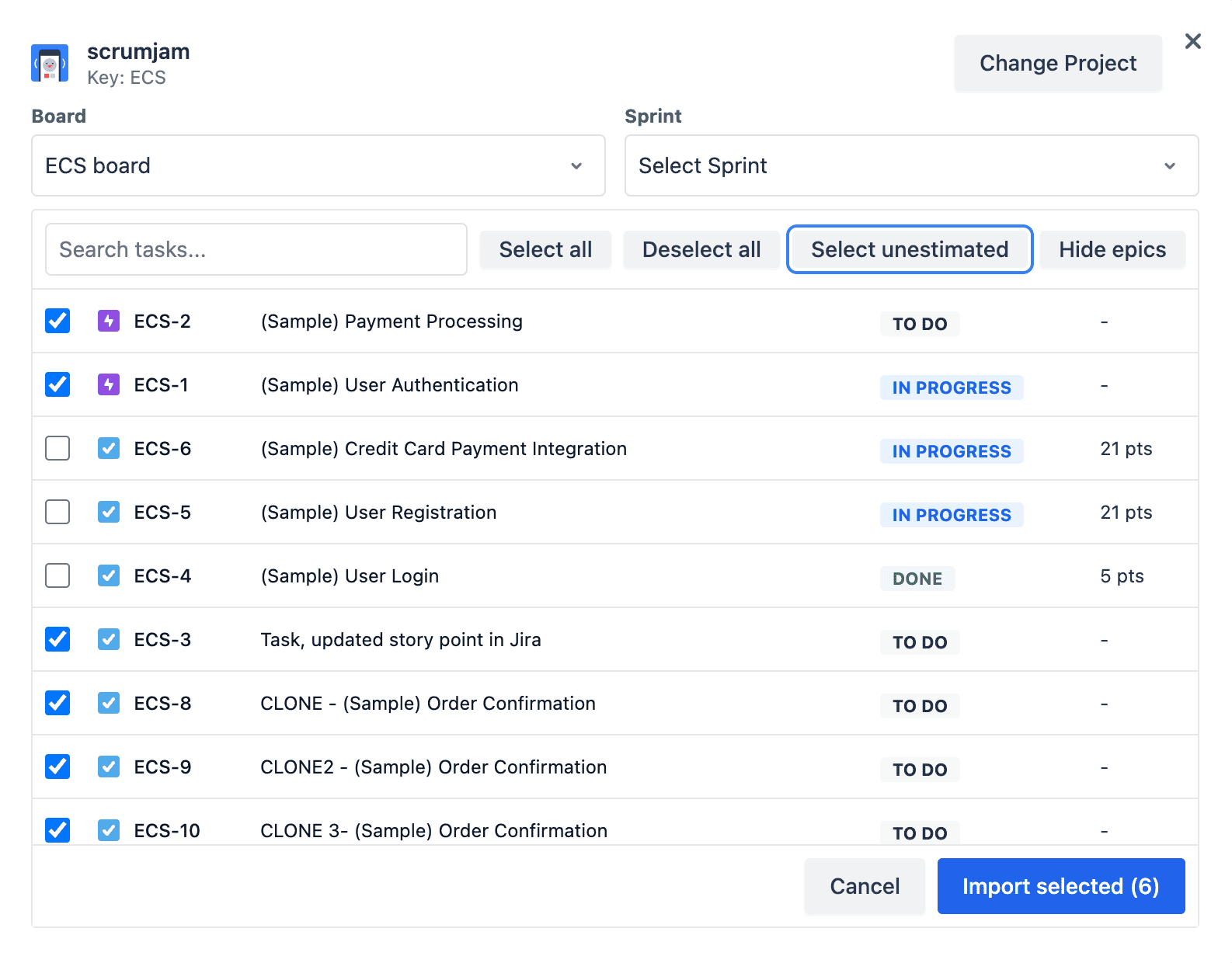
Pull issues from a project or paste JQL. Issues land in your session with keys, summaries, and existing story points so you start from truth.
Import your backlog, estimate as a team, and sync story points back to Jira after reveal. Built for sprint planning and backlog refinement.
Used by teams at 450+ companies
Everything evaluators look for when comparing planning poker tools against marketplace apps.
Pull issues from a project or paste JQL. Issues land in your session with keys, summaries, and existing story points so you start from truth.
When cards flip, ScrumJam can update the story points field on the linked Jira issue—provided you connected with write access and Jira exposes a story-points field.
Remote or hybrid, everyone sees the same issue, votes privately, and discusses after reveal—so anchoring and groupthink stay out of the room.
Imported tasks keep their Jira URLs handy so the facilitator can jump to acceptance criteria, attachments, or subtasks without leaving the flow.
Connect with Atlassian’s standard OAuth flow. Prefer read-only? You can still import and update Jira manually—write-back stays optional.
Use the classic Fibonacci deck or switch to another supported deck for your team’s convention—same Jira pipeline either way.
People who type planning poker with Jira are usually past the generic “what is planning poker?” stage. They have a backlog in Jira Software, a refinement calendar invite, and a checklist: import issues, estimate, write estimates back, audit trail optional. This page is that checklist—mapped to how ScrumJam works today.
write:jira-work) and a configured story-points field ScrumJam can discover for your site.ScrumJam treats each imported Jira issue as a task in the session. The issue key (for example PROJ-120) stays as the identifier, so what you reveal in poker lines up with what engineers see in their sprint board. After reveal, the numeric consensus can be written to the story points field on that issue—if write-back is available for your integration. If not, you still walk away with a clear final number to paste into Jira in one click from your notes.
Security reviews often ask who can change production data. In practice, limit the Jira connection to a service account or a small set of facilitators, run import in a dry run before the big room, and keep a single source of truth for which JQL filters define “ready to estimate.” Pair that with ScrumJam’s reveal flow so scores only land after the team explicitly agrees post-discussion.
For a deeper dive on permissions, data handling, and tokens, read the Jira integration overview and the security FAQ. When you are ready to try the flow end-to-end, create a team and open Planning Poker from your workspace sidebar.
Follow these steps in order the first time; afterwards the loop is mostly import → estimate → reveal.
From Dashboard, create a team workspace. Jira import is available in team planning poker sessions so your integration stays scoped to a stable group of people.

In team settings, connect Jira. You will be prompted to authorize ScrumJam. Grant read for import; add write if you want story points pushed back on reveal.


Standard OAuth—same pattern as other Jira Cloud integrations your company already approves.
Navigate to Planning Poker inside your team, start a session, and share the room link in Slack or your calendar invite so stakeholders join before you import work.
Click Import from Jira, search by project or paste JQL (for example “sprint in openSprints() AND type = Story”), multi-select the issues for this meeting, and confirm. Issues appear in your task list with keys and summaries.
Select the active issue, let everyone vote privately, reveal, and capture the agreed story points. Repeat per issue; keep the facilitator focused on timeboxing discussion after the numbers are visible.
On reveal, ScrumJam attempts to write the final estimate to the linked Jira issue’s story points field when write access and field metadata are available. Open the issue in Jira to verify the field updated before you close the meeting notes.
Try ScrumJam free
Create a free team, connect Jira once, and run your next planning poker session without spreadsheet exports.
No credit card required · Free to start